


An AI music generator produces a usable instrumental in under a minute. That changes everything for video creators who need custom soundtracks without the copyright headaches or expensive licensing fees.
Traditional music sourcing eats up hours of your production schedule. AI music for content creators has changed the math on this.
Whether you're looking for an ai music generator free option or the best ai music generator for your workflow, we'll walk you through the process of creating video soundtracks that fit your content.
Why Video Creators Need AI-Generated Soundtracks
YouTube issued over 722 million copyright claims in 2023 and already more than 2 billion(!) copyright claims in 2024 through its Content ID system. Each claim represents a creator facing potential demonetization, video removal, or even worse. The platform you rely on for distribution has become a minefield for anyone using music without proper licensing.
The Copyright Problem with Popular Music
That perfect pop song seems harmless until the strike hits. Copyright law protects every recorded piece of music worldwide the moment it is created, and using it without permission counts as copyright infringement.
The financial risk is real. Under U.S. federal law, damages can reach up to US$ 150,000 per infringed work. Individual settlements in 2022 ranged from US$ 5000,- to $ 250,000. Three copyright strikes on YouTube means your channel gets terminated (take a look at: Understand copyright strikes, ).
Copyright holders control how your video performs when platforms allow copyrighted music. They can monetize it themselves, block it worldwide, or restrict it in specific regions. You create the content, but someone else profits from it.
Here's the frustrating part: 74% of creators still don't understand how music licensing works. The gap between what you want to create and what you're allowed to use keeps growing. A sync license grants permission to pair music with video, but there's no standard rate. Copyright holders charge whatever they want or simply refuse.
Stock Music Libraries Fall Short
Royalty-free music sounds like the answer, but free doesn't mean risk-free. Many free tracks still require attribution or carry hidden restrictions. Fail to comply, and you're back to copyright strikes. Stock music libraries present their own problems. The same popular tracks appear across countless videos. Your audience recognizes that overused background music instantly. It creates a generic feel that diminishes your professional image.
Quality control varies. Poorly mixed or mastered tracks affect how professional your video appears. Most free music platforms also can change their terms at any time, leaving your published content vulnerable to takedowns. Subscription-based libraries can create a different trap: You maintain rights only while paying a monthly fees - if you cancel your subscription, you can lose the license for music in your existing videos. Not all of them act like that, some also offer Life-Time Rights, once you got a license, just be careful and download (print out) the license they grant you.
Want to monetize your content? That many times requires an even more expensive commercial license on top of your base subscription. Most libraries restrict commercial use in ways that sometimes aren't clear upfront - so read carefully, what rights you actually have. The track you grabbed for a simple video might not be cleared for the Facebook ad you want to run next month.
Time and Budget Constraints
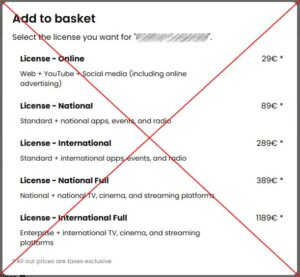 Sync licenses for popular songs cost anywhere from $ 5000.- to $ 500,000 or even more. For indie artists, you might negotiate down to $ 150 to $ 1500. Either way, it's not feasible when you're creating multiple videos per week. Stock music subscriptions run $15 to $ 50 monthly for unlimited downloads. Individual track licensing through platforms like Jamendo costs around $40 per track. These costs add up fast when you're producing content regularly.
The time investment hurts just as much. Searching through stock libraries, filtering by mood and length, previewing dozens of tracks, only to land on something you've heard in three other videos last week. Hours of production time disappear into music selection alone.
This is where an AI music generator changes the equation. Instead of sorting through overused stock tracks or risking copyright strikes, you generate unique music tailored to your exact needs.
What an AI Music Generator Does for Video Production
Think of an ai music generator as software trained on thousands of songs. It studies patterns in melody, harmony, rhythm, and instrumentation, then creates new compositions based on what it learned.
How AI Music Generators Work
The process starts with massive datasets. Developers feed AI models thousands of licensed compositions in a variety of genres. The system breaks down each song into components like chord progressions, note transitions, and instrument timbres.
Neural networks power this learning process. These algorithms identify which chords sound good together, how instruments blend, and what musical elements create specific emotions. The AI doesn't copy existing songs. Instead, it combines original material that lines up with your requirements.
You type a prompt like "calm morning in the desert" or "retro synth cityscape," and the AI maps your words to musical parameters. Text understanding converts your description into structured attributes like key, rhythm, and arrangement. The system then renders a full instrumental composition using trained neural networks.
Platforms provide different model versions for varied creative textures. You might choose between options that emphasize realism or stylization. Loop mode creates seamless repetition for YouTube videos or game environments. You control genre, mood, and instruments to match your visuals.
Speed Advantage Over Traditional Methods
The time savings are measurable. Melody generation with AI takes under 1 minute compared to at least 30 minutes using traditional electronic music software. Harmony arrangement drops from 60 minutes to about 2 minutes.
Full arrangement tasks show the biggest difference. AI completes a full track in about 2-5 minutes, while traditional methods require at least 120 minutes, most time many more hours. That is a - at least - six-fold speed increase for complete compositions.
This efficiency matters when you are producing multiple videos per week. Traditional composition demands hours or days to develop a single track. AI music generators condense that process to minutes. The workflow becomes straightforward. Select your genre, mood, and tempo. The AI generates a complete track almost instantly.
Commercial Rights Included
Here's where AI music separates itself from stock libraries. Many ai music generator platforms grant users specific rights to the generated music. You can modify it, use it commercially, and share it across platforms. Be careful also here: By no means all of them do this - always read their TOS - if you are not sure: Chose another AI to create your music.
An ai music generator free option might have limitations, but paid plans mostly include full commercial licensing. You don't pay ongoing royalties for each use. Once you generate the music, you can use it in monetized YouTube videos, social media content, product demos, and advertisements.
The licensing clarity removes guesswork. You're the originator of the work, so there are no surprise claims or hidden samples. Platforms trained on licensed catalogs ensure what you create is original and copyright-safe. You won't face takedown risks or unexpected licensing disputes.
Commercial use extends to client projects, mobile apps, games, and business websites. The ai music generator from text delivers tracks ready for professional applications without additional legal complexity.
Step-by-Step: Creating Your First Video Soundtrack with AI
Most creators skip the most important step: analyzing their footage before generating anything. Watch your video without sound first. What emotion should viewers feel during each scene?
1. Identify Your Video's Mood and Pacing
What emotion do you want the audience experiencing during this scene ? Is it heartache, excitement, or anxiety? This emotional core guides every musical decision that follows.
Tempo matters too. Two scenes might share the same emotional core but need different music. A war battle scene requires driving percussion with loud brass. A quiet death scene needs soft strings and piano.
Map out your timeline with in and out points for music. Note any sync points where the music needs to hit a visual cue. Write down the styles or emotions you want musically and the duration needed.
2. Choose the Right AI Music Generator
Suno stands out with studio-quality audio and natural vocals. It combines beginner-friendly prompts with professional features like MIDI export and a full workspace - but you have to have a paied subscription to have the necesary rights to use your created music - you cannot anymore license a music track, if it was created before you started your subscription - please read their Terms of Service by your own (pay particular attention to "You grant Suno and our partners the rights…").
Over 2 million creators have generated more than 15 million tracks using platforms like Beatoven. Beatoven offers an accessible interface that isn't overwhelming. It lets you generate music for YouTube content, podcasts, short films and advertisements. Also, be sure to read Beatoven's Terms of Service carefully (Beatoven TOS).
Songer is the AI I like best. The rights to all created tracks are clearly defined ("all of them"), eliminating any misunderstandings. Create a many tracks as you like, listen to the preview (at least one minute) of the song you created and if you like what you hear, use one of your credits to download the full track included all rights you ever will need. Yes, one credit for one song as simple as is... not like others, where you get 5 credits but need 20 for one song. As I said already, I like them the most, so simple to use - every beginner can create a nice song - and the licensing clear and easy, no fineprint and hard to find TOS...
Give it a try: Go to Songer - you will be amazed!
Yes, there are many more Music AI's out there and amlost every day a new one and many of them create very nice music tracks, like Lyria 3 from Gemini or others. But beware! I keep saying it: Read the terms of service of the AI you're using. My advice: Steer clear if the terms of service are already hard to find or you feel like you need a lawyer to understand them.
3. Write a Specific Prompt for Your Scene
Imprecise input prompts lead to generic results. Instead of "lo-fi beat," try "chill lo-fi beat with vinyl crackle, gentle piano, and an atmosphere like a rainy night." The more precisely you specify the genre, mood, tempo, and instrumentation, the better the AI will match your vision. Not always, though - sometimes it's funny that it doesn't quite fulfill your wishes but creates such an impressive track that you absolutely want to keep it, even if it wasn't exactly what you were looking for.
Include up to five, six key areas in your prompt: genre/style, instruments, vocals, tempo, mood and production quality. "Nostalgic but hopeful, like a summer evening" works better than just "happy". Describe how instruments sound and interact rather than just listing them.
Mmmh... just start start with a very simple prompt and learn how to expand it - or ask Gemini, ChatGPT or any other text based AI to create a prompt for you...
4. Generate and Preview Multiple Options
Most platforms return multiple musical options per upload. Each generation gives you variations to test against your video. Play each track over your looped video section to see if it creates the emotion you're looking for.
Create your own music – try it now!
Test different versions by changing one or two elements only, then regenerate and compare. This iteration workflow helps you refine results fast.
5. Download and Add to Your Video Timeline
Download high-quality WAV files or separate stems if your platform offers them. You receive a non-exclusive perpetual license for generated tracks and can use and monetize the music worry-free.
Export formats include MP3, WAV or stem tracks depending on your subscription tier. Add the downloaded file to your video editor's timeline and adjust volume or fades as needed.
YouTube Long-Form Content
Vlogs and lifestyle videos pair well with lo-fi hip-hop, acoustic pop, chillwave, or indie folk. These genres create warmth without competing with your narration. Tech reviews need clean electronic music with minimal beats and modern synth textures to maintain a professional feel.
Gaming content varies by intensity. Electronic rock with driving drums benefits intense gameplay, while casual commentary pairs with lo-fi or chiptune. Educational videos require ambient electronic, minimal piano, or soft synth textures that stay unobtrusive.
Keep background music 15-20 dB below dialog. Match musical energy to visual energy. Fast cuts need higher-tempo tracks. Reflective moments call for calmer arrangements.
Short-Form Video and Reels
Loop-friendly tracks become essential for auto-playing Reels and TikTok clips. Dynamic sound cues like bass drops help synchronize visual transitions. Energetic pop beats work for fitness content, while soft instrumental or acoustic tracks drive emotion for travel and lifestyle videos.
Platforms favor originality in 2026. Recycled audio tracks often get lower reach. An ai music generator free option lets you create unique soundtracks that help you stand out.
Product Demos and Explainer Videos
The best soundtrack goes unnoticed. Music shouldn't overpower your voiceover or messaging. Choose audio that matches your industry niche. Cybersecurity demos benefit from dramatic soundtracks that highlight threats, while marketing tools need brighter, lighter tracks.
Set music 6-9 dB under voiceover and land cuts on bar lines. Instrumental beds keep copy clear. Short bumpers work with one-bar hooks, while 30-second spots benefit from simple A-B structures.
Podcast Intros and Outros
Listeners decide within 30 seconds whether to keep listening. A professional intro signals quality before you speak. Intros should run 15-30 seconds. Longer versions lose listeners before content starts.
Match music to your podcast tone. Historical mystery podcasts need eerie classical pieces, while tech shows benefit from energetic hip-hop. Outros can run longer since they convert listeners into subscribers.
Social Media Ads
Ad music needs energy, 90-140 BPM for short-form video ads. The best ai music generator from text lets you prompt specific requirements like "upbeat electronic music for SaaS product launch ad, energetic tech vibe".
Music increases dwell time by over 30% in social advertising. Different platforms need different approaches. TikTok requires continuous loops, Instagram benefits from emotional build-ups, and YouTube pre-rolls need smooth ambient layers.
Writing Better Prompts for Video-Specific Music
Your prompt quality determines output quality. The difference between "upbeat music" and "128 BPM house track with syncopated hi-hats and warm analog synth pads" is the difference between generic and usable.
Describe Tempo and Energy Level
BPM numbers work better than vague speed words. The best ai music generator follows exact tempo specifications with precision. You can specify "128 BPM" or describe it as "fast-paced". Adding time signatures like "3/4" or "7/8" shapes the rhythm.
Groove concepts lock the feel better than tempo alone. Combine one tempo concept with one groove concept and build from there. For example, "120 BPM four-on-the-floor" beats "medium tempo dance music" because it removes guesswork.
Energy level is different from tempo. A slow track can still feel intense. A fast track might feel relaxed. Use descriptors like "raw," "aggressive," or "laid-back shuffle" to steer performance delivery.
Specify Instrumentation and Genre
Narrow subgenres work better than broad categories. Instead of "electronic," try "retro-futurist synthwave". The ai music generator from text interprets specific terms with higher accuracy.
Name exact instruments rather than general categories. "Fender Rhodes piano" beats "keyboard". "Muted trumpet" beats "brass". English-language instrument names perform better on most platforms.
Include Structural Requirements
Bar-based instructions improve professional feel. An ai music generator free option still responds to "8-bar intro, 16-bar verse". You can guide structure with cues like "starts with a soft intro, builds to a big chorus".
Create your own music – try it now!
Specify duration as "60 seconds" or let the model choose on its own. Dynamic length mode selects the most musical duration for your prompt.
Testing and Iteration
AI music generation involves randomness. The same prompt produces different results each time. If the output doesn't match your request, try the exact same prompt again. Most times, you'll get what you want with the second or third generation.
Make tiny adjustments like changing one word rather than rewriting everything. Small tweaks teach you what variables matter.
Conclusion
You now have everything you need to create custom soundtracks without copyright headaches or expensive licensing fees. An AI music generator puts professional-quality music in your hands within minutes.
Start with one video. Write a specific prompt, generate a few options and test them against your footage. You'll learn what works for your content style, and the process gets faster.
Match music to your video's emotion rather than chasing perfection on the first try. Keep experimenting with prompts and you'll build a library of unique tracks that make your videos stand out.
Your soundtrack solution is just one prompt away.
FAQs
Q1. Can AI tools create music videos from audio tracks?
Yes, AI music video generators can transform audio tracks into visual content. These tools allow you to upload your music and automatically generate videos that sync with your sound, creating visual experiences that match the rhythm and mood of your soundtrack.
Q2. What's the process for generating a music video using AI?
The typical workflow involves uploading your audio track to an AI platform, selecting visual style preferences and settings like lighting, fine-tuning individual shots or scenes to match your vision, and then exporting the final video for sharing across platforms.
Q3. Are AI-generated music tracks allowed on streaming platforms?
Major streaming platforms like Spotify currently allow AI-generated music on their services. While policies continue to evolve, these platforms are not banning AI music but are working with industry standards organizations to develop ways to identify which portions of tracks were created using AI technology.
Q4. What legal concerns exist around AI music generation tools?
Some AI music generation companies face copyright infringement lawsuits from music industry organizations. The main controversy centers on whether these companies properly licensed the copyrighted music used to train their AI models, with many musicians calling for transparency about training data sources.
Q5. How do I ensure my AI-generated soundtrack is copyright-safe?
Choose AI music generators that provide clear commercial licensing with your generated tracks. Look for platforms that grant you full rights to use, modify, and monetize the music you create without ongoing royalty payments or takedown risks.
Links
YouTube Processed 2.2 Billion Content ID Copyright Claims in 2024
An Empirical Study Comparing the AI Music Generation Model with Electronic Music Composition Methods